How Small Businesses Can Choose a Reliable Password Manager

Share
Small businesses depend on many online tools to operate every day. Email platforms, accounting software, payment gateways, customer management systems, cloud storage, and social media dashboards all require login credentials. As the number of digital services grows, managing passwords becomes increasingly difficult.
In many small organizations, passwords are shared informally. They might be stored in spreadsheets, written in notebooks, or sent through messaging apps. While these practices seem convenient, they create serious security risks. If one password is exposed through phishing or a data breach, attackers can quickly gain access to multiple systems.
Cybercriminals increasingly target smaller organizations because they often lack formal cybersecurity systems. According to the Verizon Data Breach Investigations Report, compromised credentials remain one of the most common entry points in cyberattacks.
A reliable password manager for small businesses helps address this challenge. It stores credentials securely, generates strong passwords, and allows teams to access shared accounts without exposing sensitive login information.
What Is a Password Manager?
A password manager is a cybersecurity tool that stores login credentials in an encrypted digital vault. It generates strong passwords, saves them securely, and automatically fills them when users log in to websites or applications.
Instead of remembering dozens of passwords, users only need to remember a single master password. The password manager handles the rest. Most modern password managers also sync across devices and monitor whether stored credentials appear in known data breaches.
Expert Insight: How to Choose a Reliable Password Manager
A reliable password manager should use strong encryption, follow a zero-knowledge security model, and support multi-factor authentication. These features ensure that stored passwords remain protected even if the service provider experiences a breach.
The most trustworthy password managers encrypt data locally on the user’s device before transmitting it to servers. This means the provider cannot read stored credentials. Independent security audits and breach monitoring tools also increase trust. Audits confirm that encryption systems work as intended, while breach alerts help users respond quickly if their credentials appear in leaked databases.
When evaluating password managers, businesses should prioritize security architecture rather than convenience alone.
TL;DR
- A password manager stores credentials in an encrypted vault.
- Strong encryption such as AES-256 protects stored passwords.
- Zero-knowledge architecture ensures the provider cannot access your data.
- Multi-factor authentication (MFA) prevents unauthorized vault access.
- Password managers allow small teams to share credentials securely without exposing passwords.
Why Small Businesses Need a Password Manager
Small businesses often operate with limited IT resources. Employees frequently manage multiple roles, and cybersecurity processes may be informal.
This environment makes password management difficult. Credentials may be reused across platforms, shared through email, or stored in unsecured documents.
A password manager helps small businesses:
- Store credentials in a secure encrypted vault
- Generate strong passwords for business tools
- Share account access safely between employees
- Monitor whether credentials appear in data breaches
Instead of relying on memory or spreadsheets, teams can manage credentials in a structured and secure way.
What Small Businesses Have to Look for While Choosing a Password Manager
- Strong Encryption Standards
Encryption is the foundation of any password manager. Without strong encryption, stored credentials could be exposed if the provider experiences a breach.
Reliable password managers use AES-256 encryption, which is widely considered one of the strongest encryption standards available today. Financial institutions, government agencies, and large enterprises rely on the same encryption model to protect sensitive data.
Another important factor is client-side encryption. In this design, passwords are encrypted on the user’s device before they are transmitted to the provider’s servers. Even if data is intercepted during transmission, it remains unreadable.
Strong encryption ensures that even if attackers access stored data, they cannot read the credentials inside.
- Zero-Knowledge Architecture
A trustworthy password manager follows a zero-knowledge security model. This means the provider cannot see or access the passwords stored inside your vault.
Only the user possesses the encryption key needed to decrypt the stored data. The provider stores encrypted information but does not hold the key required to interpret it.
This architecture significantly reduces risk. Even if the company’s servers are compromised, attackers cannot read stored credentials without the user’s master password.
For businesses, this provides an additional layer of privacy and protection.
- Multi-Factor Authentication (MFA)
Even strong passwords can sometimes be compromised through phishing attacks or malware. Multi-factor authentication adds an extra security layer.
With MFA enabled, accessing the password vault requires more than just the master password. Users must verify their identity through an additional authentication factor.
Common methods include:
- Authenticator apps that generate temporary codes
- Hardware security keys
- Biometric authentication such as fingerprint or facial recognition
According to Microsoft security research, enabling MFA can block more than 99% of automated account attacks.
- Independent Security Audits
Security claims should always be verified by external experts. This is why independent security audits are important.
Reputable password manager providers invite third-party cybersecurity firms to review their software, infrastructure, and encryption systems. These audits examine potential vulnerabilities and confirm that security controls are implemented correctly.
Some providers publish transparency reports summarizing these audits. Choosing a password manager that undergoes regular external reviews provides additional confidence in its security practices.
- Secure Password Generation
Human-created passwords often follow predictable patterns. Many people combine familiar words, names, or numbers when creating passwords.
Password managers solve this problem with built-in password generators. These tools create random combinations of characters that are extremely difficult for attackers to guess.
Users can customize password length and complexity. Some password managers also support passphrases, which combine multiple random words into longer passwords.
Using unique passwords for each account prevents attackers from accessing multiple systems after a single breach.
- Breach Monitoring and Alerts
Large-scale data breaches occur regularly across the internet. When credentials are exposed, attackers often distribute them through underground forums and dark web marketplaces.
Many password managers include breach monitoring tools. These systems check whether stored credentials appear in known breach databases.
If a compromised credential is detected, the user receives an alert prompting them to update the password immediately.
Early warnings help businesses act quickly and reduce the chances of attackers exploiting leaked credentials.
- Secure Password Sharing for Teams
Small businesses often need multiple employees to access the same platforms. This might include marketing tools, analytics dashboards, payment gateways, or social media accounts.
Sending passwords through email or messaging apps creates security gaps. If an employee leaves the company, controlling access becomes difficult.
A password manager allows teams to share account access without revealing the actual password. Administrators can control permissions and revoke access when needed.
This approach helps organizations maintain better control over sensitive credentials.
Features Small Businesses Should Prioritize
When selecting a password manager, small businesses should focus on features designed for teams and shared access.
Important capabilities include:
- Role-based access control
Employees only access credentials relevant to their role. - Secure password sharing
Teams can access shared accounts without exposing the password. - Centralized management
Administrators can manage vaults, permissions, and security policies from a single dashboard. - Activity monitoring
Administrators can track login attempts and password access.
These features help small organizations maintain accountability while protecting sensitive data.
Comparison Table: Password Manager Features for Small Businesses
|
Feature |
Why It Matters for Small Businesses |
Example Tools |
|
AES-256 Encryption |
Protects stored credentials with strong encryption even if servers are breached |
Bitwarden, 1Password, Dashlane |
|
Zero-Knowledge Architecture |
Ensures the provider cannot read stored passwords |
Bitwarden, NordPass |
|
Secure Password Sharing |
Allows teams to access shared accounts without revealing the password |
1Password, Keeper |
|
Role-Based Access Control |
Restricts access based on employee roles |
NordPass, Dashlane |
|
Admin Dashboard |
Provides centralized password management |
LastPass, Dashlane |
|
Audit Logs |
Tracks password access and security events |
Bitwarden, Keeper |
|
Multi-Factor Authentication |
Adds additional protection against unauthorized access |
Most major providers |
|
Cross-Platform Access |
Allows access across desktop, mobile, and browser environments |
Bitwarden, 1Password |
|
Breach Monitoring |
Alerts businesses if credentials appear in leaked datasets |
Dashlane, NordPass |
|
Shared Team Vaults |
Organizes passwords by department or project |
1Password |
Key Cybersecurity Statistics About Passwords
Understanding credential risks highlights why password management matters.
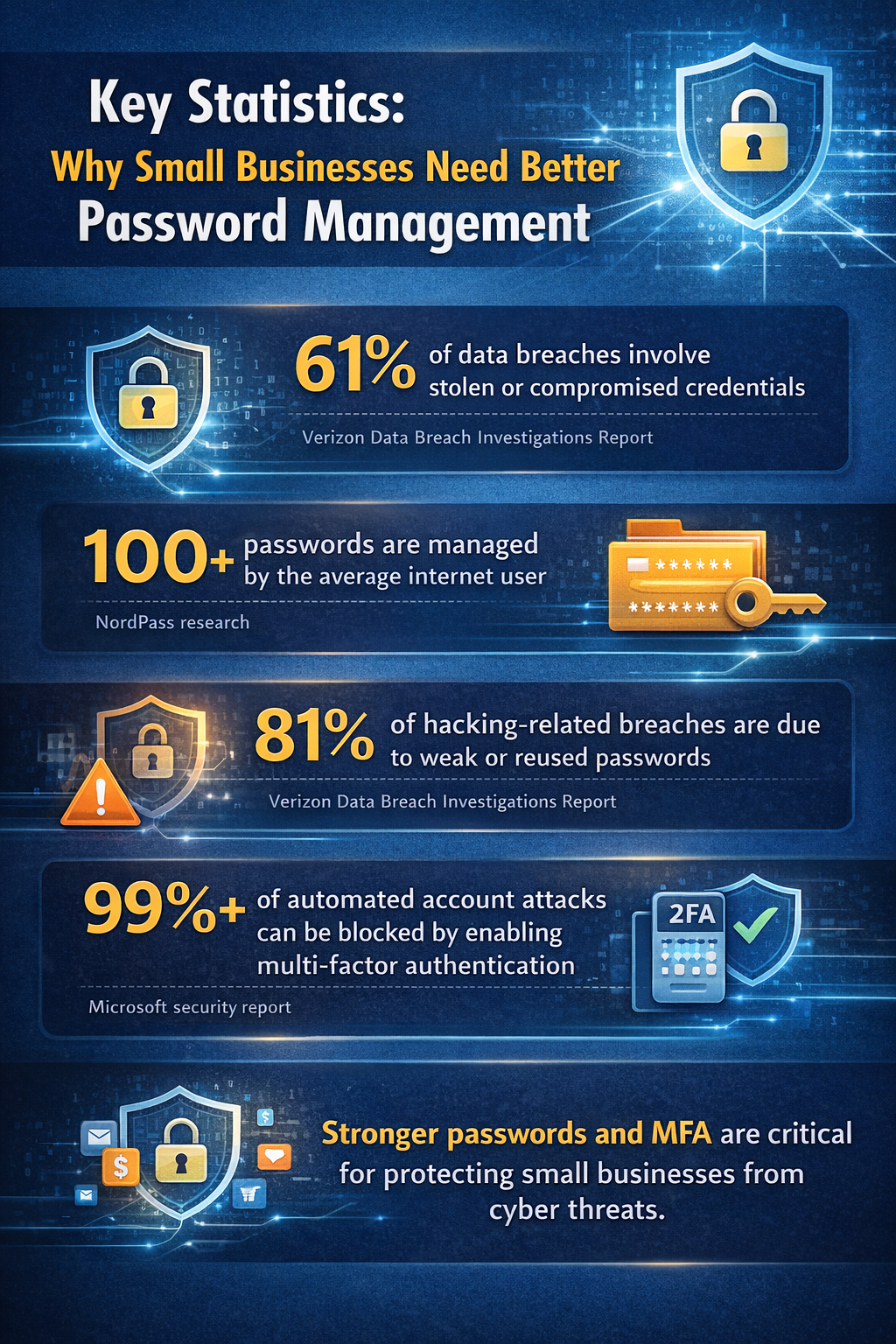
- 61% of data breaches involve stolen or compromised credentials, according to the Verizon Data Breach Investigations Report.
- The average user manages more than 100 passwords, according to NordPass research.
- 81% of hacking-related breaches involve weak or reused passwords, according to Verizon.
- Microsoft reports that multi-factor authentication blocks more than 99% of automated attacks.
These numbers show why stronger password practices are essential for businesses.
What Makes a Password Manager Reliable?
A reliable password manager uses strong encryption such as AES-256, follows a zero-knowledge architecture, and supports multi-factor authentication.
It should also undergo independent security audits and provide tools for password generation, secure sharing, and breach monitoring.
For small businesses, centralized management and access control features are also important because they allow organizations to manage credentials across teams.
To Sum Up
Password security remains one of the most overlooked areas of cybersecurity for small businesses. Informal practices such as sharing passwords through email or storing them in spreadsheets increase the risk of unauthorized access.
A reliable password manager provides a structured and secure way to manage credentials. With encryption, multi-factor authentication, and centralized management, businesses can protect sensitive systems while making password management easier for employees.
Choosing the right password manager helps organizations strengthen cybersecurity without adding unnecessary complexity.
FAQs
Are password managers safe for small businesses?
Yes. Password managers that use strong encryption, zero-knowledge architecture, and multi-factor authentication provide a secure way to manage business credentials.
Can employees share passwords securely using a password manager?
Yes. Most password managers allow teams to share access without revealing the actual password, which improves security.
What happens if a password manager provider is hacked?
If the service uses strong encryption and zero-knowledge architecture, attackers cannot read stored passwords because the data remains encrypted.
Do small businesses really need password managers?
Yes. Password managers help small teams manage credentials securely, reduce password reuse, and control access to critical business systems.