
Cybersecurity for Remote Teams: Protecting Devices, Accounts, and Data

Share
Remote work gives employees greater flexibility and allows companies to build teams across different locations. It has become a practical way for many businesses to operate and grow. However, working outside the office can expose business systems to unsafe Wi-Fi, personal devices, weak passwords, phishing messages, and careless file sharing. One small mistake may put sensitive company information at risk. This guide explains how cybersecurity for remote teams can protect devices, accounts, connections, and data through clear policies and practical security measures that employees can follow every day.
Why Remote Teams Face Different Security Risks
Office-based employees normally use company networks and devices monitored by an IT team. Remote employees may work from homes, hotels, airports, or shared offices. Each location introduces different remote work security risks.
Family members may use a personal laptop. The default password for a home router may still be used. Because it’s easy, an employee might also store a corporate document on a personal cloud account.
Managing the security of remote teams is difficult in these situations. IT specialists may not always be able to see the networks, devices, and programs that employees use. Authorized technologies and clear protocols are therefore essential for the cybersecurity of remote workers.
For instance, an employee might get a message about cloud storage that looks authentic. The employee is sent to a fake login website by the message. Emails, papers, and linked business software can all be compromised by a single negligent login.
Protect Devices Used by Remote Employees
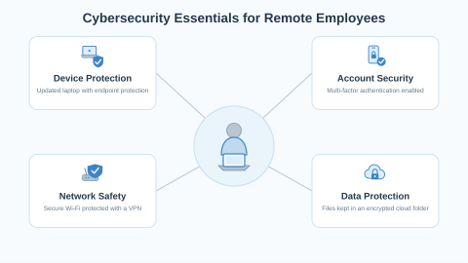
Strong remote device security begins with knowing which laptops, phones, and tablets can access business systems. Companies should provide managed devices whenever possible.
Use Company-Managed Devices
A managed laptop allows the IT team to control updates, security settings, and approved applications. The team can also lock the device or remove business information if it is lost.
Personal devices are harder to control. They may contain unsupported software, unapproved browser extensions, or applications downloaded from unsafe sources.
Establish Rules for Personal Devices
A BYOD security policy should explain what employees must do before using a personal device for work. Basic requirements can include:
- Registering the device with the IT team
- Using a separate profile for business activity
- Enabling a screen lock and device encryption
- Allowing business information to be removed remotely
These measures help create secure remote work without giving a company unnecessary access to an employee’s personal information.
Install Updates and Endpoint Protection
Security upgrades must be applied quickly to operating systems, browsers, and apps. Patches that are delayed may leave known vulnerabilities exposed to attack.
Antivirus software, a firewall, threat monitoring, and automatic screen locking should all be part of endpoint security for remote workers. Before dangerous conduct reaches corporate systems, these controls aid in its detection.
Full-disk encryption should also be enabled. Consider an employee who leaves a laptop in a taxi. A strong password and encrypted drive make it much harder for another person to read the files. This is a practical example of remote device security reducing the effect of a physical loss.
Strengthen Account and Access Security
Protected laptops cannot stop an attacker who obtains a valid username and password. For this reason, cybersecurity for remote teams must include strong identity controls.
Require Strong, Unique Passwords
Every business account should have a different password. Reusing the same password means one compromised service could give an attacker access to several systems.
An approved password manager can create and store long passwords. Employees should never send credentials through email, chat, or shared documents.
Enable Multi-Factor Authentication
For remote employees, multi-factor authentication adds a second stage of verification. It might not be sufficient to grant access even if a password is stolen.
Generally speaking, codes sent by text messaging are less secure than passkeys, security keys, and authenticator apps. Businesses should employ more robust methods for email, financial systems, cloud platforms, and administrator accounts.
Limit Access to What Employees Need
Controlled permissions are necessary for remote workers to have a secure account. Payroll details, for instance, shouldn’t be automatically accessible to a marketing staff member.
IT teams and managers should check permissions on a regular basis. Access must be promptly removed, and unused accounts must be disabled when an employee or contractor leaves. By doing these things, you may increase remote access security and reduce the potential damage caused by a compromised account.
 Protect Home Networks and Remote Connections
A secure device can still face threats when it connects through an unsafe network. Reliable remote work security therefore includes the employee’s internet connection.
Secure Home Wi-Fi
Employees should change the router’s default administrator name and password. They should also install firmware updates and use WPA2 or WPA3 encryption.
Creating a separate network for work devices can prevent smart televisions, gaming systems, and other connected products from communicating directly with a business laptop. These steps support secure home Wi-Fi for remote work.
Be Careful with Public Networks
Public Wi-Fi may expose employees to fake hotspots and traffic interception. Sensitive work should not be completed through an unknown network.
When public access is unavoidable, employees should use an approved mobile hotspot or protected connection. Good VPN security for remote work can encrypt traffic between the device and company network. However, a VPN cannot stop phishing, unsafe downloads, or stolen passwords.
Using approved connections is one of the most important remote work security best practices, especially for employees who travel regularly.
Keep Company Data Safe Outside the Office
Data security for remote workers depends on where information is stored, how it is shared, and who can open it. Employees should use approved company servers or cloud platforms rather than personal email, local drives, or consumer file-sharing applications.
Store and Encrypt Sensitive Information
Encryption helps protect information while it is stored and transferred. Companies should also classify files according to their sensitivity so employees understand how each file must be handled.
For example, a public marketing brochure does not require the same controls as customer payment information. Clear labels help employees make better decisions.
Control File Sharing
Secure file sharing for remote teams should include recipient verification, limited permissions, and expiration dates for shared links. Public links should be disabled unless there is a valid business reason for using them.
Before sending sensitive material, staff members should verify names and email addresses. A reportable data incident may be caused by a single incorrect recipient.
Back Up Business Information
Automated backups protect files from ransomware, hardware failure, and accidental deletion. Businesses should test recovery procedures instead of assuming every backup works.
These practices make data security for remote workers part of daily operations rather than an occasional IT task.
Help Employees Recognize Phishing
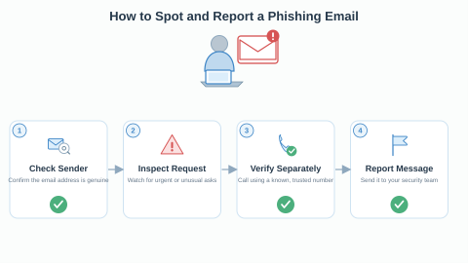
Attackers often target remote employees through email, chat, text messages, and false login pages. A message may appear to come from a manager and request an urgent payment or confidential document.
Effective phishing prevention for remote workers instructs individuals to look for:
- Complete email address of the sender
- Surprising attachments and links
- Requests for cash or credentials that are urgent
- Unusual modifications to payment details
Consider an employee getting a communication from a person posing as the director of finance. Within fifteen minutes, the person asks to pay the seller. Rather than answering right away, the employee calls the director at a known number and finds out that the request is fraudulent.
A simple reporting button or a dedicated security email address makes cybersecurity easier for remote workers. Employees should be encouraged to report mistakes right away without fear of being held accountable.
Build a Remote Workforce Security Policy
A remote workforce security plan gives employees a single, reliable source for appropriate behavior. Travel, software installation, file storage, devices, passwords, network access, and incident reporting should all be covered.
Good cybersecurity for remote teams also requires clear ownership. Employees must follow security rules, managers must approve suitable access, and IT teams must maintain protective systems.
Provide Short, Relevant Training
Security training should reflect the situations employees actually face. Short sessions can cover phishing, password management, safe file sharing, home-network protection, and lost-device reporting.
Security training should reflect the risks employees face while working outside the office. Developing practical knowledge of cybersecurity controls can help professionals understand access management, network protection, threat detection, and incident response. Training supports remote team security, but it must be combined with suitable tools, clear policies, and simple reporting procedures.
Prepare for Security Incidents
Employees should know what to do when something goes wrong:
- Disconnect a device if it may be compromised
- Contact the designated security team immediately
- Preserve suspicious emails or messages
- Change credentials when instructed
- Follow the approved recovery procedure
A clear response process supports secure remote work because employees do not have to guess what to do during a stressful event.
Remote Work Security Checklist
A short remote work security checklist helps managers find missing controls before they become serious problems.
| Security area | Main risk | Required protection | Owner |
| Devices | Malware or theft | Updates, encryption, and endpoint protection | IT team |
| Accounts | Stolen credentials | Unique passwords, MFA, and access reviews | IT and managers |
| Networks | Unsafe connections | Protected Wi-Fi and approved VPN | Employee |
| Files | Accidental exposure | Approved storage and limited sharing | Employee and manager |
| Incidents | Delayed response | Simple reporting and recovery process | Security team |
The most useful remote work security best practices are often basic. Keep devices updated, require MFA, restrict unnecessary access, and store information only in approved systems.
Conclusion
Protecting every location where work is done is the key to effective cybersecurity for remote teams. Managed devices, secure accounts, secure network connections, regulated file sharing, dependable backups, and transparent reporting protocols are all necessary for businesses. Workers also require clear directions that they can adhere to without slowing down their work. Security becomes a regular element of business operations when management, IT teams, and remote workers are aware of their obligations. While enabling workers to operate effectively from diverse locations, consistent restrictions and frequent checks help safeguard firm data.