Apple Pay Phishing Scam Targets Users With Fake Support Calls and Account Takeovers

Share

A new phishing campaign is targeting Apple Pay users through a mix of realistic emails and fake customer support calls. The scam is designed to look official, feel urgent, and pressure people into handing over access to their Apple ID and payment details.
This is not a technical flaw in Apple Pay itself. It is a coordinated social engineering attack. The attackers rely on fear, timing, and trust in a familiar brand to trick users into lowering their guard.
If you use Apple Pay, this is the kind of scam you need to know about.
How the Apple Pay Scam Works
This campaign follows a clear, repeatable pattern. Each step is designed to move the victim closer to giving up control of their account.
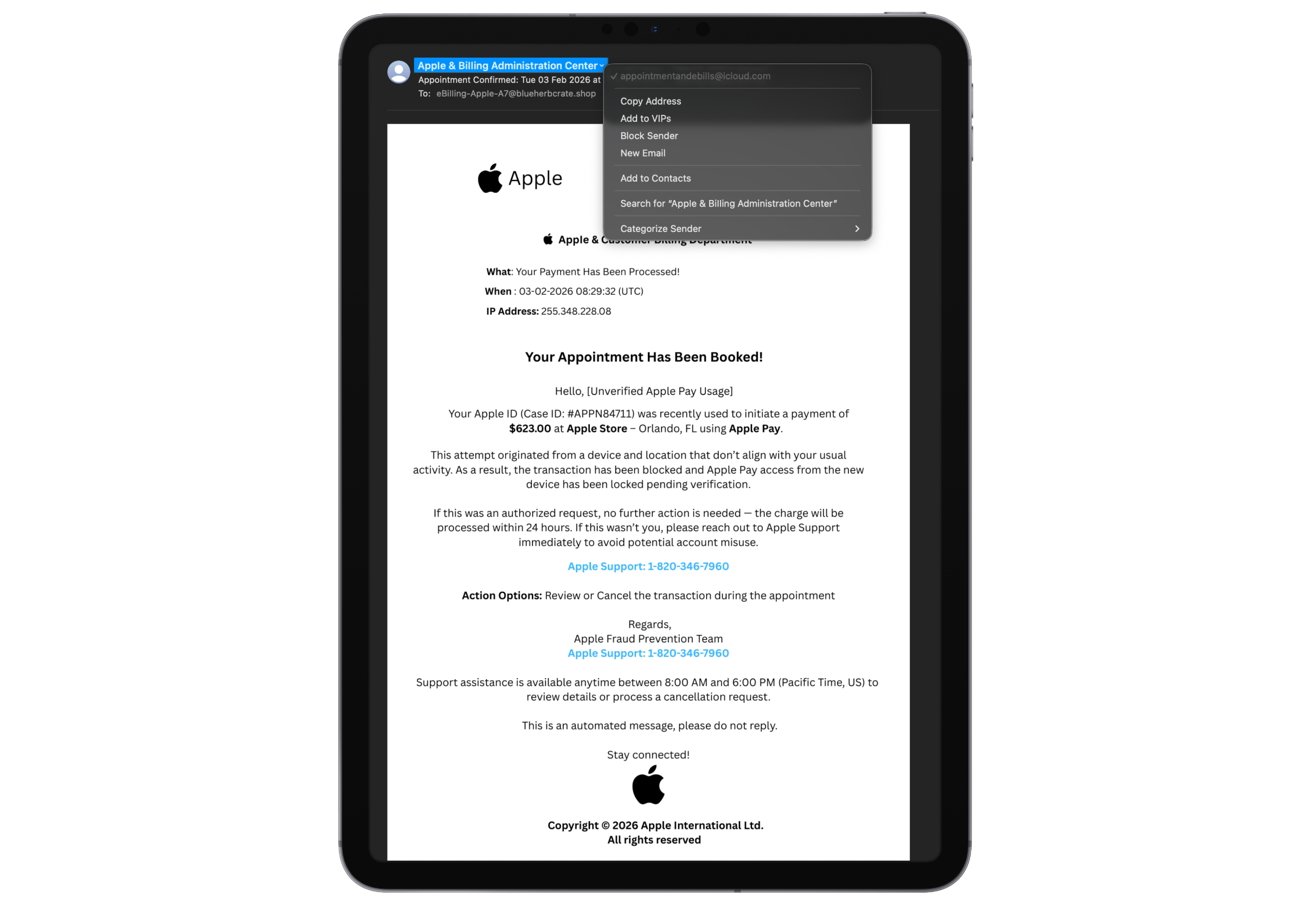
Courtesy: Appleinsider
Step 1: The Fake Fraud Alert Email
Victims receive an email that appears to come from Apple’s billing or fraud team. The message claims that a purchase was made using Apple Pay and that the transaction has either been flagged or already processed.
Some of the emails reference specific high-value purchases to make the threat feel real. In one reported example, the email claimed an Apple Gift Card purchase of $279.99 and urged the recipient to call a support number to “stop” the charge. Another example showed a fake “Invoice Receipt – Paid,” styled to look like an Apple Store receipt for a 2025 MacBook Air 13-inch with an M4 chip, priced at $1,157.07. The email framed it as an unauthorized transaction and included a phone number to call for help.
These messages often include order numbers, timestamps, and invoice-style formatting. The goal is to make the email look like a legitimate billing confirmation, so the recipient reacts emotionally before checking the details.
Step 2: The Call to “Apple Support”
The email instructs the user to call a phone number to resolve the issue. This number does not belong to Apple.
When the victim calls, they reach a scammer posing as an Apple support agent. The scammer speaks calmly and uses support-style language to sound professional. The caller is reassured that the issue can be “fixed” right away, which keeps them on the line.
Step 3: Trust-Building and Information Gathering
The fake support agent starts by asking simple questions to build credibility. This can include the user’s name, the Apple devices they use, or partial phone number details.
Once the victim is convinced the call is legitimate, the scammer asks for the Apple ID email address. Soon after, they request a verification code to “confirm identity.”
At this point, the attacker is actively trying to log in to the victim’s Apple ID. The verification code sent to the victim’s phone is real. When the victim reads it out, the attacker uses it to complete the login and gain access to the account.
Step 4: Account Takeover and Payment Abuse
With access to the Apple ID, attackers can take over the account. This can lead to unauthorized Apple Pay transactions, changes to account recovery details, or attempts to lock the victim out entirely.
In some cases, scammers continue the call and claim they are “securing” the account while quietly extracting more information, such as additional codes or linked payment details.
Why This Scam Is Working
This campaign is effective because it blends realism with emotional pressure.
- The emails look like genuine invoices or receipts
- The amounts mentioned are large enough to trigger panic
- The phone call feels human and reassuring
- The verification code is real, which creates false trust
- The sense of urgency reduces the chance that the victim will stop to verify
Even cautious users can slip when a message looks like proof of a costly, unauthorized purchase.
Red Flags to Watch For
These are strong signs the message is not real:
- An unsolicited email about an Apple Pay or Apple Store purchase you did not make
- An email asking you to call a phone number to fix the issue
- Pressure to act immediately to prevent financial loss
- Requests for verification codes, passwords, or recovery details
- Invoice-style emails for expensive items you never ordered
- Sender addresses that do not clearly match official Apple domains
Apple does not ask users to resolve billing issues by calling numbers included in emails.
What To Do If You Receive a Similar Message
If you get one of these emails:
- Do not click links or call the number in the message
- Open your Apple Wallet app or Apple ID settings directly and review recent activity
- If you are concerned, contact Apple Support through the official app or website
- Report the message and delete it
If you already shared a verification code or login details:
- Change your Apple ID password immediately
- Review all devices connected to your account and remove anything unfamiliar
- Check Apple Pay and bank statements for unauthorized transactions
- Inform your bank if you see suspicious activity
This scam highlights how modern phishing attacks are no longer crude or easy to spot. They are designed to look like normal billing communications and use live interaction to defeat security features that users trust. Technology is not what fails here. The attack succeeds by exploiting human behavior during moments of stress and urgency.
FAQs
Is Apple Pay itself compromised?
No. This attack does not involve a breach of Apple Pay systems. It relies on tricking users into giving up access to their own accounts.
How can scammers get past two-factor authentication?
They do not break it. They manipulate users into sharing real verification codes during a live login attempt.
Will Apple ever ask me to call a number from an email?
No. Apple does not include support phone numbers in unsolicited emails and does not ask users to call to resolve fraud issues.
How can I safely check if a transaction is real?
Open your Apple Wallet app or Apple ID account directly. Do not use links or numbers in messages.
What should I do if I am unsure whether an alert is real?
Treat it as suspicious. Check your account manually through official Apple channels or contact support from the Apple Support app or website.