I Received a Threatening Email, Here’s Why It Was a Scam

Share
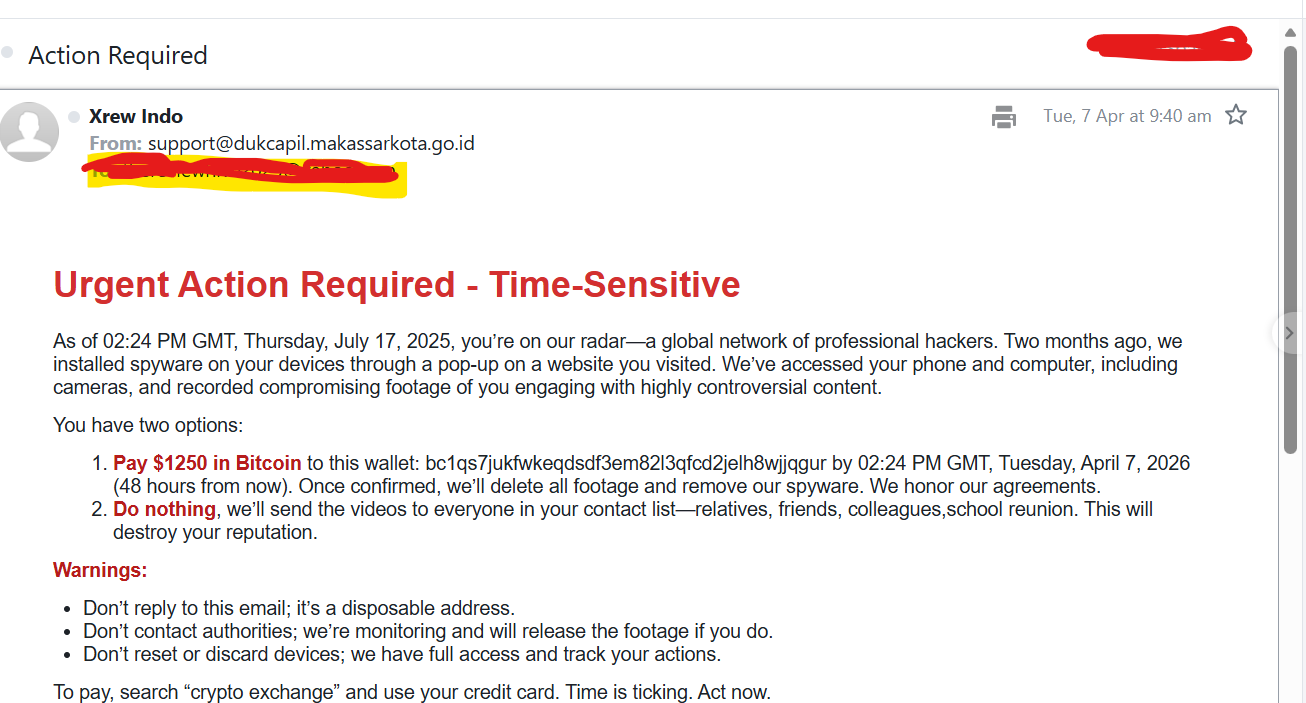
A few days ago, I received an email that was meant to do one thing, scare me into paying money fast. It claimed that hackers had installed spyware on my devices, recorded compromising footage, and would send those videos to my contacts if I did not pay them in Bitcoin. At first glance, the message was disturbing. But once I slowed down and examined it carefully, the red flags became obvious. This was not a real security warning. It was a scam built on fear, shame, and urgency.
TL;DR:
I received a threatening email that claimed hackers had access to my phone, computer, and camera. It demanded a Bitcoin payment and warned me not to contact authorities. I checked the sender, reviewed the email headers, looked at the message content closely, and confirmed that it was a sextortion scam. In this article, I am sharing what the email said, the steps I took, the red flags I found, and what you should do if you get one.
What the Email Claimed
The email I received had a simple subject line, “Action Required.” The message claimed that a global network of professional hackers had installed spyware on my devices through a pop-up on a website. It said they had access to my phone, my computer, and even my cameras. Then it moved to the real pressure tactic. It claimed that compromising footage had been recorded and would be shared with everyone in my contact list unless I paid $1250 in Bitcoin.
The language was written to make me panic. It warned me not to reply, not to contact authorities, and not to reset or discard my devices. It also tried to create urgency by attaching a deadline to the payment. This is a common pattern in sextortion scams. The goal is to make the recipient act emotionally before thinking clearly.
Why I Did Not Trust the Email
I did not want to dismiss it blindly, but I also did not want to react emotionally. So I started looking at the details.
The first red flag was the sender address. The email did not come from Yahoo or from any service that would have a reason to contact me about account security. It came from an unrelated domain.
I checked the sender’s domain name next. It was not a Yahoo domain, and it was not connected to any service I use. The address appeared to belong to an Indonesian government domain, which made the email even more suspicious because there was no reason a message like this should come from there.
The second red flag was the Bitcoin demand. Legitimate companies do not threaten people and ask for cryptocurrency in exchange for silence. Bitcoin is often used in scams because the transactions are difficult to reverse.
The third red flag was the lack of proof. The email made serious claims, but it did not provide any real evidence. There were no screenshots, no actual device details, no login history, and no information that showed the sender truly had access to my systems.
The fourth red flag was the wording and timeline. The message referenced dates and deadlines in a sloppy way. It tried to sound precise, but the timing did not feel natural or consistent. Scam emails often do this because they are mass-produced templates.
The Steps I Took After Receiving the Email
I think this part matters most, because many people receive these emails and do not know what to do next. Here are the steps I took.
1. I did not reply
My first decision was simple. I did not respond. Scammers want engagement. Even a reply can confirm that an email account is active and being monitored by a real person.
2. I did not pay
This kind of message is designed to make people panic and pay quickly. I did not send money, and I strongly advise others not to do so either. Paying does not guarantee anything. It only rewards the scammer and may encourage more threats later.
3. I looked closely at the sender details
I checked the sender’s name and the actual email address behind it. Display names can be misleading. Anyone can make a message look official on the surface. The real clue is the sending address and domain.
4. I checked the sender’s domain
This was one of the most important checks I made early on. The email did not come from Yahoo or from any service linked to my account. The domain appeared to belong to an Indonesian government website, which made the message feel even more suspicious. There was no logical reason for a threatening email about spyware, blackmail, and Bitcoin to come from a government-linked domain that had nothing to do with me.
5. I opened the raw message and checked the headers
This was the most important technical step. I viewed the full email headers to see how the message had actually traveled. I looked at fields such as:
- Return-Path
- Received
- Authentication-Results
- SPF
- DKIM
- DMARC
This helped me understand whether the message was simply spoofed or whether it had been sent through a real mail server tied to that domain.
6. I checked whether the email was authenticated
The headers showed that SPF, DKIM, and DMARC had passed for the sender domain. That might sound convincing at first, but this is where people often get confused. A message passing those checks does not make it trustworthy. It only means the email was authorized to send as that domain.
That is an important distinction. A scam email can still pass authentication if the sender is using a real mailbox, a compromised account, or an abused mail server from that domain.
7. I reviewed the message content with a clear head
Once I stopped looking at the email emotionally and started looking at it analytically, the scam pattern became obvious. The message relied on panic, embarrassment, urgency, and isolation. It wanted me to feel trapped. That is exactly how sextortion emails are written.
8. I decided to turn the experience into awareness content
Instead of letting the email sit in my spam folder as just another disturbing message, I decided it was worth writing about. If I received it, many others probably have too. And not everyone knows how to check headers or spot these red flags.
What the Email Headers Actually Told Me
One of the biggest misconceptions around phishing emails is that they are always badly forged or full of obvious technical flaws. That is not always true.
In this case, the headers suggested that the email was not pretending to be Yahoo. It was not a fake Yahoo alert. It appeared to have been sent through a real server associated with the sender domain, or through infrastructure authorized to send for that domain.
That does not make the threat real. It only means the email was authenticated for that domain.
This is why readers should understand something important: an authenticated email can still be malicious. Authentication checks help verify the sending domain, but they do not verify the sender’s intent.
So when I looked at the headers, I did not stop at “pass.” I looked at the full picture:
- The sender was unrelated to the claim.
- The content was classic extortion material.
- The payment request was in Bitcoin.
- There was no proof of compromise.
- The language used pressure and fear instead of facts.
That combination mattered more than any single technical field.
Why These Threatening Emails Work on So Many People
These scams work because they are built around human psychology. The sender does not need real access to your camera or contacts to make the email frightening. They only need to make you imagine the worst-case scenario.
The tactics are simple:
- Shame
The message suggests private or controversial content, because embarrassment makes people less likely to ask for help.
- Urgency
The deadline is meant to shut down careful thinking. The scammer wants the target to act before checking facts.
- Isolation
Warnings such as “do not contact authorities” or “do not reply” are meant to cut the victim off from support.
- Technical intimidation
Terms like spyware, remote access, and full device control are used to make the threat sound advanced and believable.
When these tactics are combined, even a person who is usually cautious can feel shaken. That is why awareness matters.
How to Tell a Threatening Email Is a Scam
If you receive an email like this, here are the signs to look for:
- It demands payment in cryptocurrency
That is one of the strongest red flags. Scammers prefer crypto because it is hard to recover once sent.
- It threatens exposure or humiliation
This is a standard sextortion tactic. The goal is emotional pressure.
- It provides no real proof
If there are no screenshots, no specific details, and no verifiable evidence, treat the claim with skepticism.
- The sender domain does not match the story
If the email claims to be from a known service, but comes from an unrelated domain, that is a major warning sign.
- The message pressures you not to seek help
Any message telling you not to contact authorities or not to tell anyone is trying to control your response.
- The writing feels templated
Scam emails often sound generic, even when they try to sound personal.
What You Should Do If You Receive a Similar Email
If this happens to you, here is the practical response:
- Do not reply
There is nothing to gain by engaging with the sender.
- Do not pay
Payment does not prove the threat will stop. It only benefits the scammer.
- Report it through India’s official cybercrime portal
If you are in India, report the email through the National Cyber Crime Reporting Portal. It is the official Government of India platform for reporting cybercrime complaints online. If the case involves urgent financial fraud, you can also use the 1930 helpline for quick reporting.
- Mark it as spam or phishing
This helps your email provider improve filtering and protects other users too.
- Delete the email
There is no reason to keep reopening something designed to distress you.
- Change your password if you feel uneasy
This is especially useful if you reuse passwords or if the email makes you doubt your account security.
- Turn on two-factor authentication
This adds another layer of protection to your email and important accounts.
- Run a malware scan
Even if the email is a scam, scanning your device can give you peace of mind.
- Review your account activity
Check for unfamiliar logins or security alerts in your email account.
Why I Wanted to Write About This
I wanted to write this article because these scams are not just technical threats. They are psychological attacks. They exploit fear, privacy concerns, and the hope that a victim will quietly pay to make the problem go away. For readers who are not deeply technical, a message like this can feel convincing. It uses the language of hacking, surveillance, and urgency. But once you break it down, the pattern is easier to see. I also think it is important to say this clearly: receiving a threatening email does not mean your device has been hacked. And seeing SPF, DKIM, or DMARC pass in the headers does not mean the message is safe. Context matters. Intent matters. The full picture matters.
To Sum Up
I received a threatening email that claimed hackers had access to my devices, my camera, and my contacts. It demanded Bitcoin and tried to pressure me into acting quickly and quietly. Instead of reacting emotionally, I checked the sender, reviewed the email headers, studied the message content, and confirmed what it really was, a sextortion scam built to frighten the recipient into paying. One of the details that stood out early was the sender’s domain, which appeared to belong to an Indonesian government website and had no connection to my email account or to the claims in the message. That mismatch made the email even harder to trust. The experience reminded me that phishing is not always about fake login pages or suspicious links. Sometimes it is just a carefully written threat designed to trigger panic. The best defense is to slow down, verify the details, and refuse to let fear make the decision for you.
Key Takeaways
- A threatening email is not proof of a real hack.
- Bitcoin payment demands are a major red flag.
- Fear, urgency, and secrecy are common phishing tactics.
- Email headers can reveal whether a message was spoofed or sent through a real domain.
- Even an authenticated email can still be a scam.
- The safest response is to avoid replying, avoid paying, report the message, and secure your accounts.
Focused FAQs
- Is a threatening email proof that my device was hacked?
No. A threatening email alone is not proof of a real compromise. Many sextortion scams are sent in bulk and rely on fear rather than evidence.
- What if the email says it has access to my camera?
That claim is common in sextortion emails. Unless the sender provides real, verifiable proof, do not assume it is true.
- Can a scam email pass SPF, DKIM, and DMARC?
Yes. Those checks can pass if the email is sent through a real or compromised domain. Passing authentication does not make the message trustworthy.
- Should I reply to a sextortion email?
No. Do not reply, do not negotiate, and do not pay.
- Why do scammers ask for Bitcoin?
Bitcoin and other cryptocurrencies are harder to reverse and easier for scammers to move anonymously.
- What should I do immediately after receiving a threatening email?
Do not reply. Mark it as spam or phishing. Change your password if needed. Turn on two-factor authentication. Run a device scan if you want added peace of mind.